How we manage GitHub Actions
The Pkl project comprises multiple repositories on GitHub (23 at the time of this writing). These repositories are built in different ways, and thus require different CI configurations.
At the same time, we have common patterns that are applied across codebases. Some of these are:
-
Every repo should have different workflows for "prb", "build", and "release".
-
We want to avert security issues:
-
Calling into actions should pin to the checksum (e.g.
actions/checkout@abc123…instead ofactions/checkout@v6). -
Running
actions/checkoutshould, by default, setpersist-credentials: false
-
-
We want our workflows to be typechecked, and minimize the chances of creating invalid workflows.
-
We want our builds to publish test reports.
Naturally, we turn to Pkl to help us address all of these problems!
Defining workflows using the com.github.actions package
To define workflows, we start by using the com.github.actions Pkl package.
This package defines the classes and types that go into authoring the eventual workflow YAML files.
| This package was originally forked from https://github.com/stefma/pkl-gha. Thanks to StefMa for his work! |
At a basic level, defining a workflow in Pkl is similar to defining a workflow in YAML, but includes the benefits of Pkl’s rich toolings: code-completion, documentation, and typechecking.
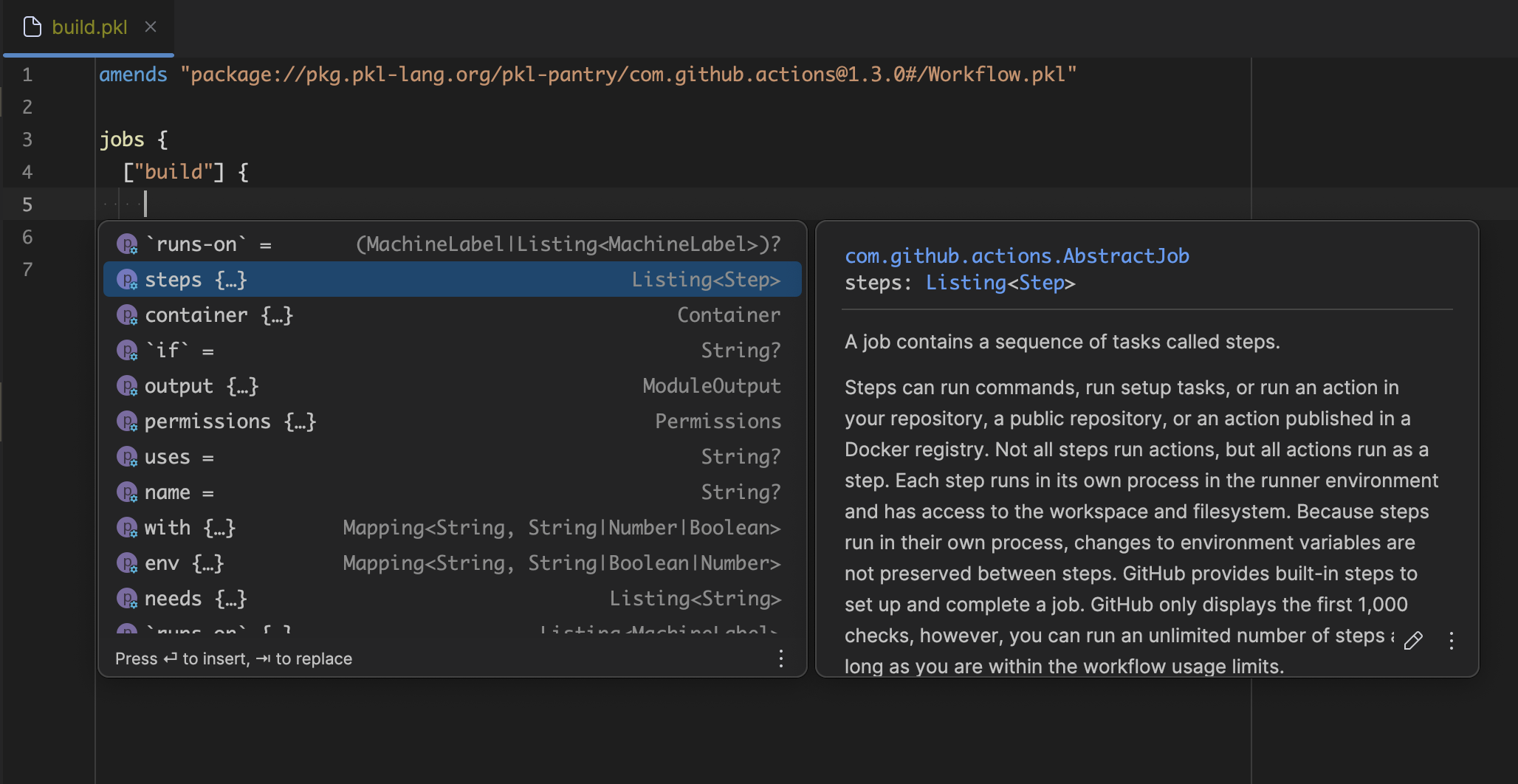
The com.github.actions package provides some extra goodies when defining workflows.
Actions catalog
The com.github.actions includes a "catalog" of
GitHub’s core actions (actions that are within the actions org).
These actions have their schema also defined in Pkl, which means that you have all the goodies you might expect, including typechecking and documentation.
Additionally, the typings for some properties has been improved.
For example, the paths property of the upload-artifacts action is really just a list, represented as a newline-separated string.
Our catalog provides a property called pathList, which defines this as a Listing and joins it back to a string for you before rendering.
import "@com.github.actions/catalog.pkl"

local uploadAction = (catalog.`upload-artifact@v5`) {
  with {
    // Pkl will error if you specify an int or a boolean here.
    name = "build-results"

    // no need to use a newline-separated string!
    // Pkl will fuse this back into a string for you.
    pathList {
      "*.sh"
      "*.bin"
    }
  }
}
Creating your own typed actions
The catalog contains typed steps; steps whose input properties have fine-grained types. However, it only contains definitions for things within the core actions repo. But, no worries! You can create your own typed steps either by hand-rolling their definitions, or by generating them.
To generate a typed step for your action, use the generate-action Pkl script.
For example:
pkl eval package://pkg.pkl-lang.org/pkl-pantry/com.github.actions.contrib@1.0.6#/generate-action.pkl \
  -m .github \
  -p action-name=docker/build-push-action@v5 \
  # Specify the simple name of your GitHub Actions package
  -p action-package-name=com.github.actions
This will generate a file at path .github/docker/build-push-action/v5/BuildPushAction.pkl.
You can also use the ActionGenerator API for finer-grained control. For example, this provides a way to specialize the types for this action’s inputs.
You can even create your own catalog which extends the upstream catalog:
extends "@com.github.actions/catalog.pkl"

import "docker/build-push-action/v5/BuildPushAction"

`docker/build-push-action@v5`: BuildPushAction
Pinning actions to git SHAs
Actions versions are typically specified as tags or branches (e.g. uses: actions/checkout@v6).
However, doing so leaves your pipelines vulnerable to a supply chain attack: if an attacker gains write access to an action’s repository, they can swap out your build definition and inject malicious code.
This has compromised many pipelines in the past. For example, see CVE-2025-30066.
One mitigation is to pin to a git SHA. This causes GitHub to look up an immutable commit, instead of a mutable tag or branch.
-uses: actions/checkout@v6
+uses: actions/checkout@8e8c483db84b4bee98b60c0593521ed34d9990e8 # v6
To help with this, we’ve created a template called DependabotManagedActions.
This template replaces each action’s version with its resolved git SHA.
Additionally, it uses a fake workflow called __lockfile__.yml to help it generate your workflows.
The module contains the following logic:
-
Load the existing lockfile if it exists.
-
For each action, look up its resolved version in the existing lockfile
-
If the action does not exist in the lockfile, or if the lockfile does not exist, resolve it from GitHub and add it to the lockfile.
-
Remove any actions from the lockfile if they aren’t being used in any workflows.
-
-
Create all workflow YAML files, replacing any
useswith the resolved git SHA, and a YAML comment with the original version. -
Create the new lockfile (no-op if no actions have changed).
-
Create a
.github/dependabot.ymlthat is configured to update GitHub Actions.
This module is published to pkl-pantry, and available for anybody to use!
To use it, you would typically create a .github/PklProject with com.github.actions and pkl.github.dependabotManagedActions as dependencies.
amends "pkl:Project"

dependencies {
  ["com.github.actions"] {
    uri = "package://pkg.pkl-lang.org/pkl-pantry/com.github.actions@1.3.0"
  }
  ["pkl.github.dependabotManagedActions"] {
    uri = "package://pkg.pkl-lang.org/pkl-pantry/pkl.github.dependabotManagedActions@1.0.0"
  }
}
Then resolve the project.
This creates a PklProject.deps.json file that also should be checked into version control.
This command only needs to be run when dependencies have changed.
pkl project resolveWith that setup out of the way, you then create a root entrypoint module that contains all of your workflows.
Typically, this is called .github/index.pkl.
amends "@pkl.github.dependabotManagedActions/DependabotManagedActions.pkl"

import "@com.github.actions/catalog.pkl"

workflows {
  ["workflows/build.yml"] =
    // define your workflows as normal!
    // they can either be defined inline, or imported from elsewhere.
    import("build.pkl")
}
You then use pkl eval to turn Pkl into the resulting YAML files:
cd .github
pkl eval -m . index.pkl

# or if you're in the project root
pkl eval --project-dir .github/ -m .github/ .github/index.pkl
Defining shared workflows and creating our own abstraction
We have some common workflows that we want pretty much every one of our repositories to have. Having a consistent CI experience across every repo improves the contributor experience and streamlines maintenance. For example, there are:
-
prb.yml— The workflow that gets triggered when users submit or commit to pull requests. -
build (main).yml— The workflow that gets triggered when commits land on the main branch.
Additionally, we want our workflows to publish test results to be made available within our GitHub Actions.
To address these needs, we’ve defined an abstraction just for our purposes. It does quite a lot; some of the things it does include:
-
Define pull request and push triggers for each different type of workflows.
-
Define permissions that make sense for each type of workflow.
-
Add additional steps for uploading test report artifacts.
-
Add additional job for processing test reports.
-
Add a workflow for processing test reports just for pull requests (this is how EnricoMi/publish-unit-test-result-action works).
-
Pass all of these workflows to DependabotManagedActions for version locking.
There’s quite a lot going on in PklCI, but the actual API surface area is quite small.
For example, on the consumption side, it looks something like this:
amends "@pkl.impl.ghactions/PklCI.pkl"

import "@com.github.actions/Workflow.pkl"

local myWorkflow: Workflow = new {
  jobs {
    ["build"] {
      module.catalog.`actions/checkout@v6`
      new {
        run = "make build"
      }
    }
  }
}

// run the same build definition when running pull request builds,
// and when building the main branch.
prb = myWorkflow

main = myWorkflow

// add steps to each workflow to publish unit test results.
// look for JUnit test reports within directory build/test-reports.
testReports {
  junit {
    "build/test-reports/**/*.xml"
  }
}
If you’re curious about how our stuff works, our source code is publicly available for all to browse.
Updating all of our repositories
Pkl is a large project, and it’s pretty untenable to be manually updating all 23 repos every time one of our library dependencies change. So, when we adjust the logic in our abstraction layer, we use helper scripts to generate, review, and merge pull requests.
These are:
-
update_downstream_ci.sh: generate pull requests for every repository.
-
approve_downstream_prs.sh: approve pull requests for each repository.
-
merge_downstream_prs.sh: merge approved pull requests with passing checks for each repository.
Try it out yourself
Try writing your own actions using Pkl!
Here is a quickstart guide:
-
Set up your local environment
-
Install the Pkl plugin for your editor of choice.
-
Install the
pklCLI for your machine.
-
-
Create your
PklProject.github/PklProjectamends "pkl:Project" dependencies { ["com.github.actions"] { uri = "package://pkg.pkl-lang.org/pkl-pantry/com.github.actions@1.3.0" } // optional; use this if you want your actions to be locked to git SHAs. ["pkl.github.dependabotManagedActions"] { uri = "package://pkg.pkl-lang.org/pkl-pantry/pkl.github.dependabotManagedActions@1.0.0" } } -
Run
pkl project resolve .githubto create yourPklProject.deps.json -
Write Pkl-based workflows
-
Create new Pkl modules that amend
Workflow.pkl.github/build.pklamends "@com.github.actions/Workflow.pkl" on { push {} } jobs { ["build"] { steps { // etc } } } -
If not using
index.pkl(see the next step): eval this into YAML:cd .github pkl eval build.pkl -o workflows/build.yml
-
-
(Optional) Create an entrypoint with DependabotManagedActions.
-
Create your
index.pklfile.github/index.pklamends "@pkl.github.dependabotManagedActions/DependabotManagedActions.pkl" workflows { ["workflows/build.yml"] = import("build.pkl") } -
Run
pkl evalcd .github/ pkl eval -m . index.pkl
-
Acknowledgments
Thanks to @StefMa for creating the original pkl-gha package, and also thanks to the folks at typesafegithub for providing typings for existing actions!